
NewKurokoBot by Mizuno Technologies
AI agents that do the daily work — and show you every step.
KurokoBot gives your team a set of focused AI agents that check stock, prepare purchase orders, read documents and file email — working from your own data, with your rules, and never submitting anything without your approval.
Set up and supported by a senior engineer · Houston, TX · Serving clients across North America
The problem
The same checks, every morning, by hand.
Spreadsheets checked line by line
Someone scans stock levels, reorder points and expiry dates before the day can start — and hopes nothing was missed.
Orders retyped into portals
The reorder list gets copied into the supplier's website one item at a time, with backorders handled on the fly.
Answers buried in files and inboxes
The document you need is somewhere in Downloads, and the email that matters is under fifty that don't.
How it works
Give an agent a job in plain English. It handles the rest.
- 01
Ask
"Check today's inventory and write the report." No forms, no query language.
- 02
The agent loads the right skill
It follows your written procedure — your thresholds, your expiry window, your rules.
- 03
It works on your data, in the open
Every step is listed as it runs, and the result is saved as a report you can open and share.
- 04
It hands off — or waits for you
Work passes to the next agent. Anything that spends money stops for your approval first.
Product tour
One desk for your agents, your data and your rules.
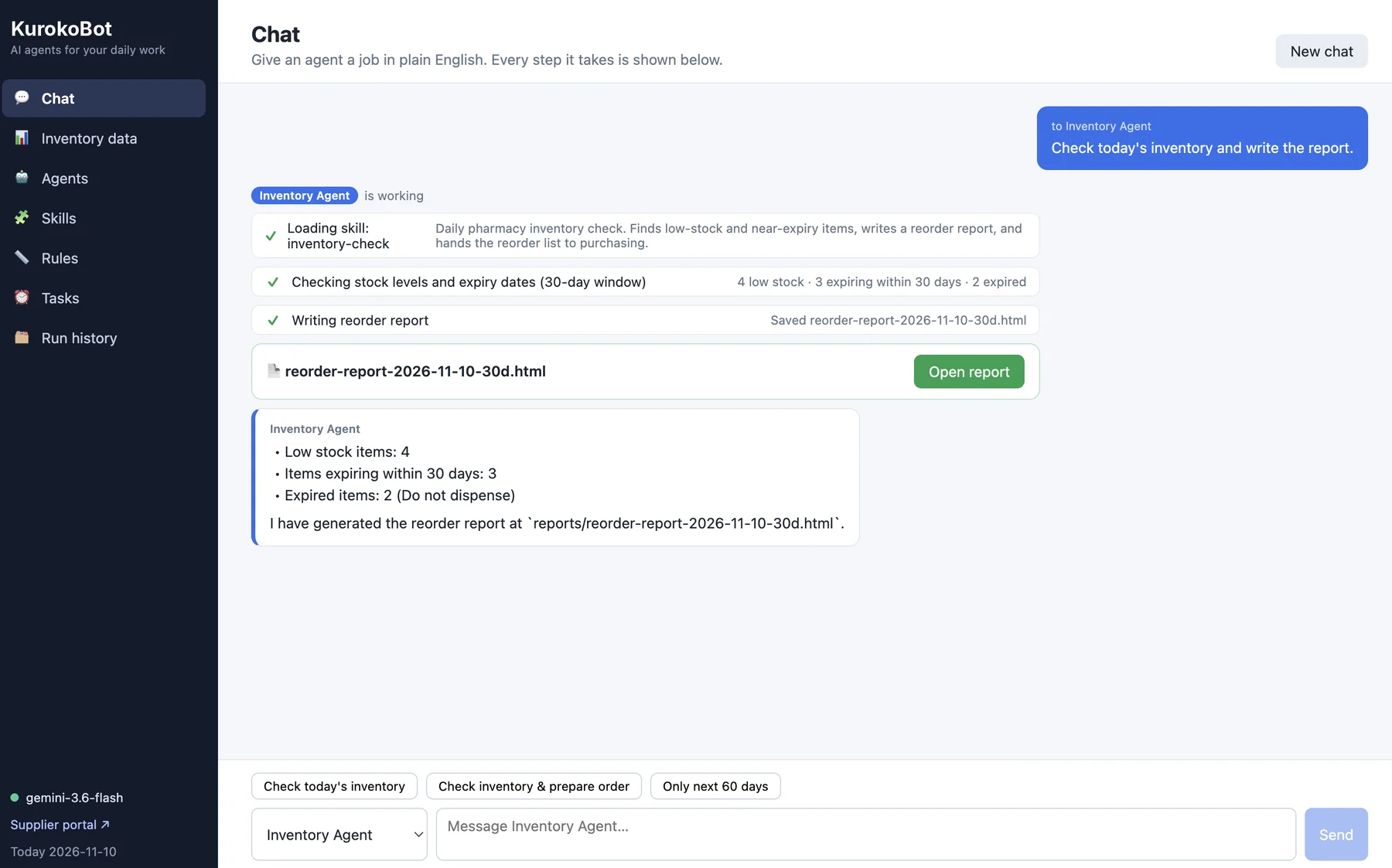
Ask in plain English. Watch every step.
Pick an agent, type the job, and follow along as it works — which skill it loaded, what it checked, which file it saved.
- One-click starters for routine jobs
- Step-by-step progress, not a spinner
- Finished reports open right from the chat
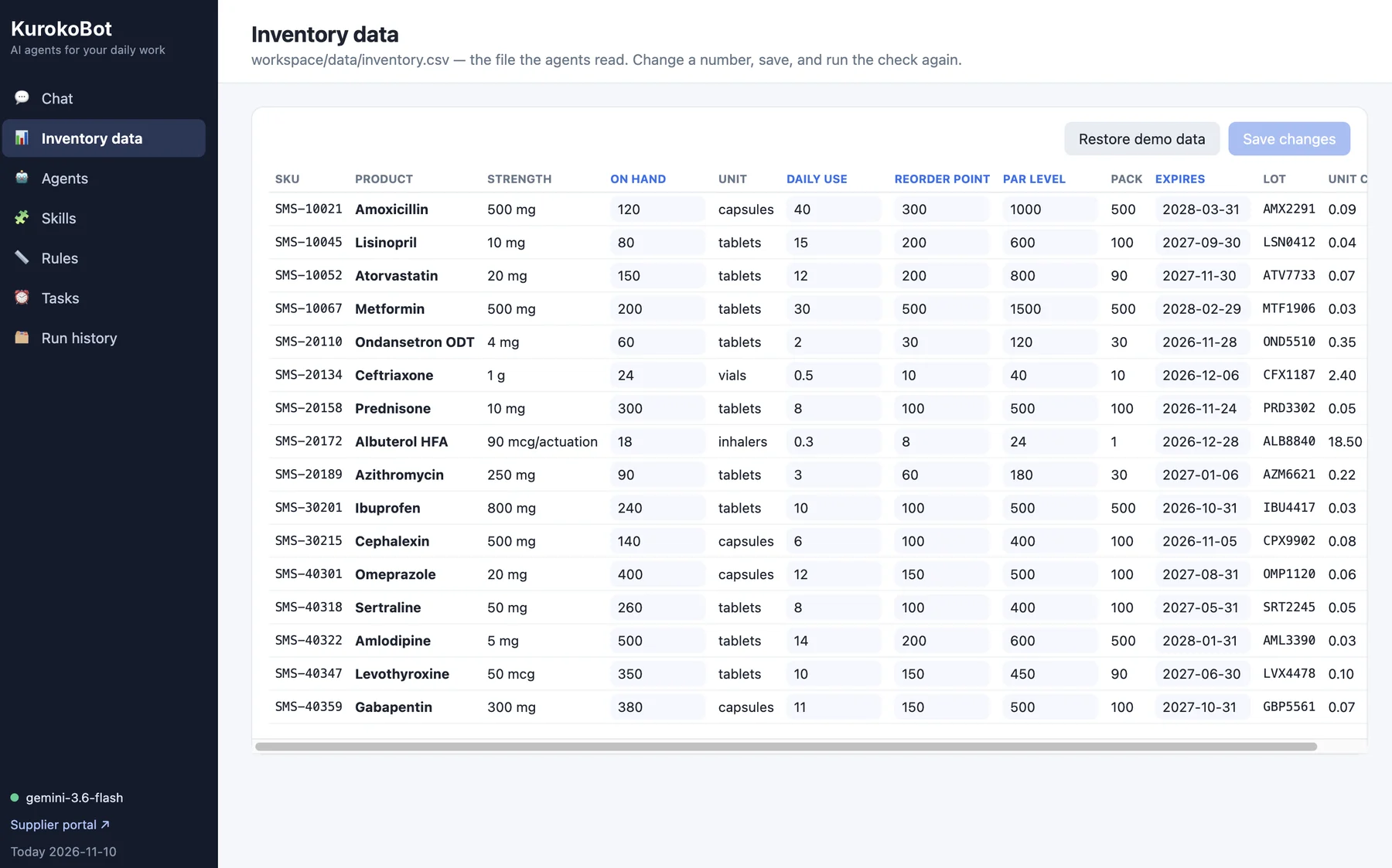
Working from your real numbers.
Agents read the same file your team keeps: on hand, daily use, reorder point, par level, expiry and lot. Change a number, save, and run the check again.
- Editable in the app, no spreadsheet juggling
- Reorder point, par level and expiry built in
- Restore demo data any time while you try it
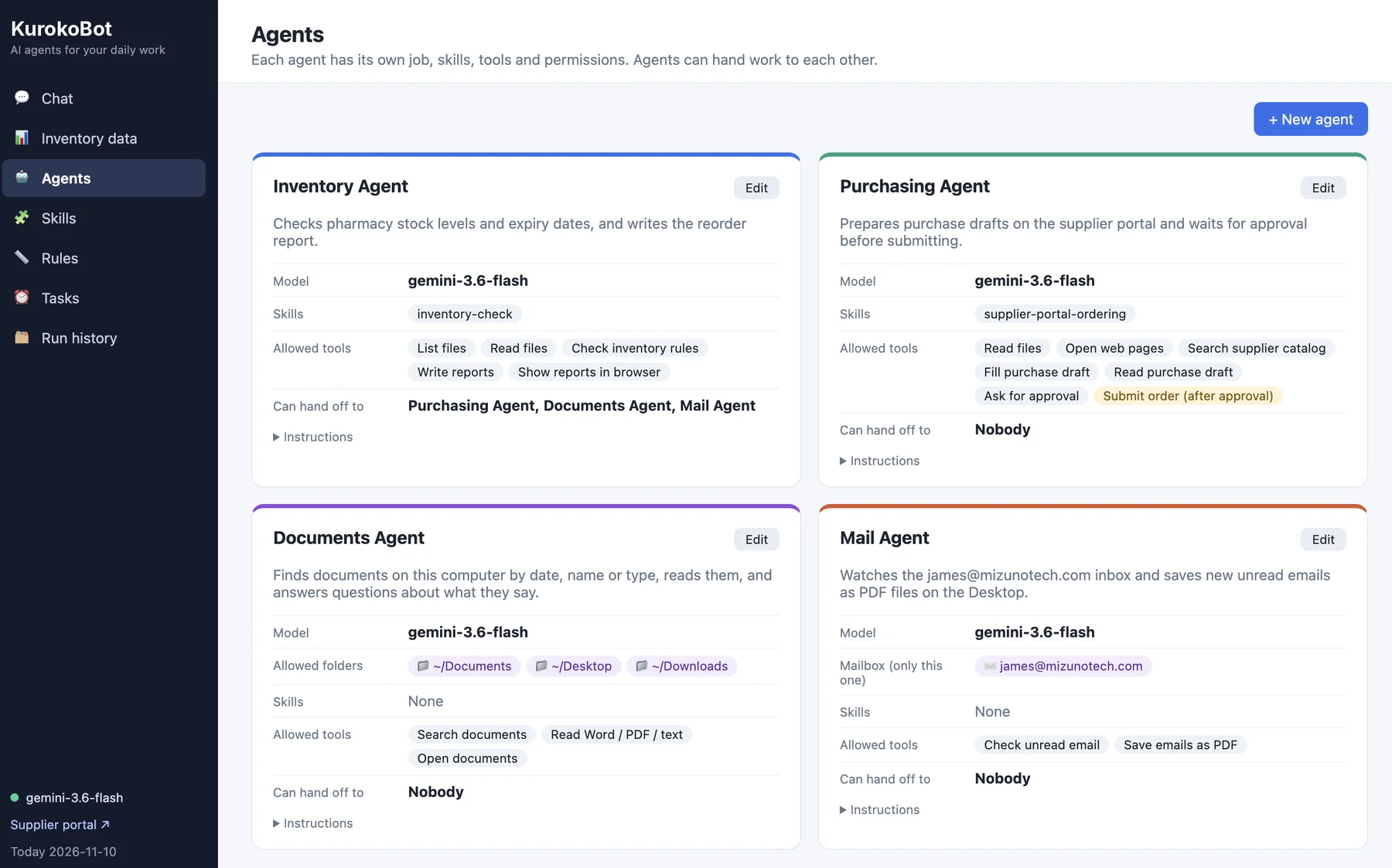
A small team, each with one job.
Inventory, Purchasing, Documents and Mail agents ship ready to configure. Each has its own model, skills, allowed tools and folders.
- Hand-offs only to the agents you list
- Ordering limited to drafts until approved
- Add new agents for your own workflows
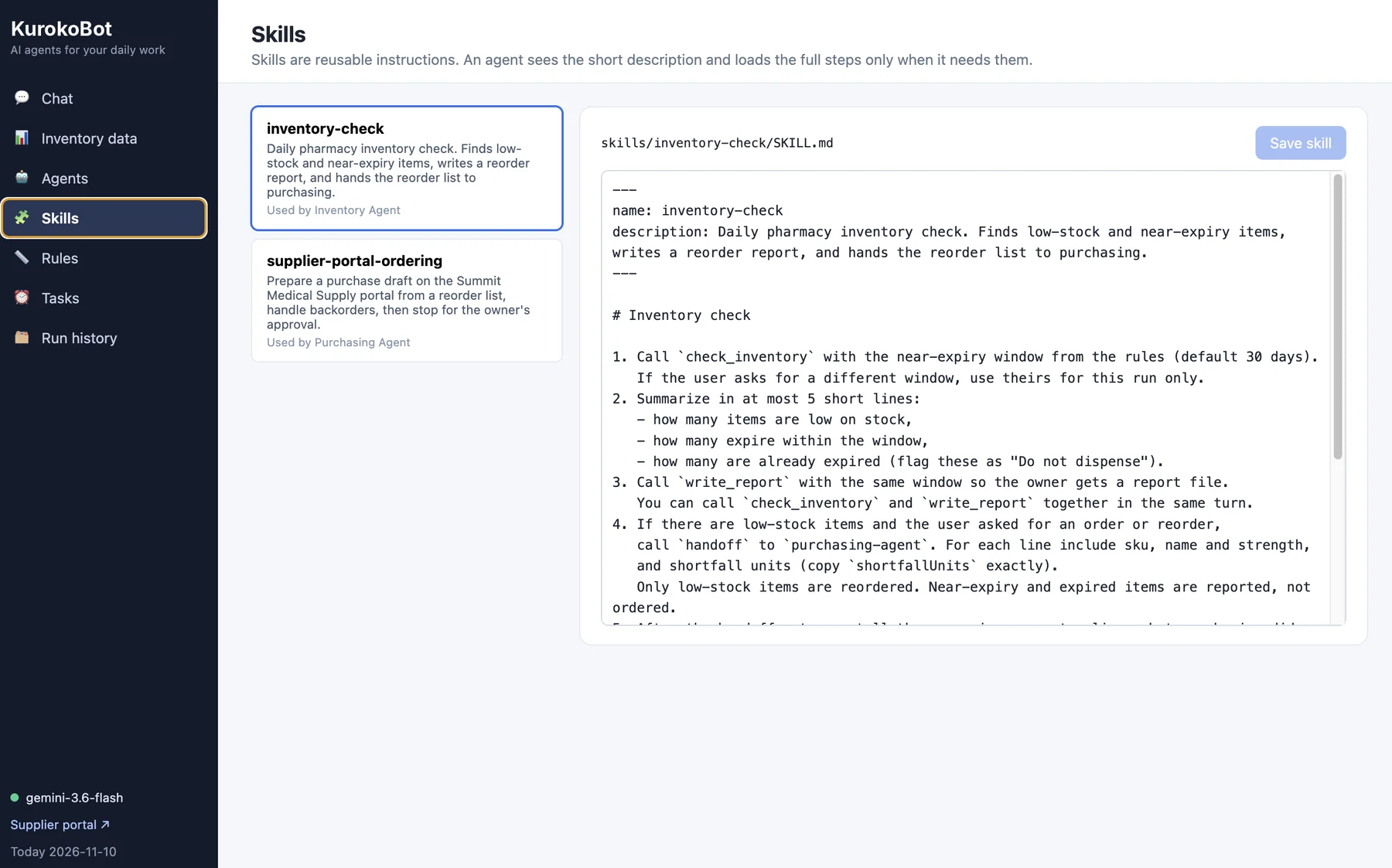
Your procedures, written once.
Skills are plain-language instructions. An agent sees the short description and loads the full steps only when it needs them.
- Readable by anyone on the team
- Edit a skill and the next run follows it
- Reusable across agents
See it in practice
A morning inventory check, start to finish.
One sentence to the Inventory Agent. It reads every item on your list, applies the thresholds and expiry window from your rules, saves a dated reorder report, and — when you ask for an order — hands the low-stock list to the Purchasing Agent, which prepares a draft on the supplier portal and waits for your sign-off.
See this run live in a demoResult of a demo run · reorder-report-2026-11-10-30d.html
4
Low on stock
3
Expiring within 30 days
2
Expired — flagged "Do not use"
- Loaded skill: inventory-check
- Checked stock levels and expiry dates
- Saved the reorder report
- Purchase draft ready — waiting for your approval
You stay in control
Automation with guardrails, not a black box.
Approval before anything is submitted
Agents prepare orders and drafts. Submitting is a separate permission that only runs after you approve.
Permissions per agent
Each agent gets only the tools, folders and mailbox it needs — and a fixed list of who it may hand work to.
Every step on the record
Each run lists what the agent did, and Run history keeps past runs so you can see what happened and when.
Your rules, on your schedule
Set thresholds and windows once in Rules, and use Tasks to run routine checks without being asked.
Who it's for
Works in any industry with routine work to run.
If your team repeats the same checks, orders and lookups every day, KurokoBot can take them on — whatever you make, move or manage.
Inventory & stock
Daily stock and expiry checks, items below par, reorder reports.
Purchasing
Purchase drafts on supplier portals, backorders handled, your approval before submit.
Documents & records
Find files by date, name or type, and get answers from what they say.
Email & admin
New mail watched and saved where it belongs, routine reports written for you.
Why Mizuno
Software you can see into, from people who build it.
KurokoBot is set up for your workflows by the same senior engineers who deliver Mizuno's custom software and compliance work.
Senior oversight
A senior or principal engineer leads your rollout. No account managers in between.
Fitted to your process
We write the skills and rules around how your team already works, then hand them to you to edit.
Plain-language updates
Weekly written updates during setup, and a clear scope before work starts.
Common questions
Will an agent ever place an order on its own?
No. Agents prepare the purchase draft and ask for approval. Submitting is a separate step that only runs after you approve it.
Can we add agents for our own workflows?
Yes. Each agent is defined by its job, skills, tools and permissions. We build the first ones with you, and your team can edit skills and rules in plain language afterwards.
Which AI model does it use?
The model is set per agent, so each job can use the one that fits it. We'll recommend a setup on the demo call.
Where does our data live?
Agents only reach the folders, files and mailbox you allow. We'll walk through how KurokoBot is deployed for your setup on the demo call.
How much does it cost?
Pricing depends on the agents and workflows you need. We'll walk through options on the demo call.
Book a demo
See KurokoBot on a workflow like yours.
30 minutes with a senior engineer. No sales sequence.
- A live run of the agents — chat, hand-offs and approval
- Which of your daily tasks an agent could take on first
- A plain-language outline of setup, timeline and cost